
Desktop workstation
One workstation for the parts traders usually scatter.
If strategy building, TradingView setup, backtesting, statistics, live controls, and credentials live in separate places, your process gets slower and riskier. OttoTrader brings them into a native Windows and macOS workstation where execution stays local.
OttoTrader keeps exchange credentials, strategy state, Demo and Live Real contexts, and final execution checks in the desktop app. Website services support your account, marketplace access, and remote monitoring.
Loose strategy ideas are hard to test. Build in Visual Builder or Code, test through Backtesting and Strategy Optimiser, review reports, and move only reviewed logic into operation.
Automation becomes dangerous when context silently changes. Running sessions keep their original exchange, market type, mode, pair, client, and strategy context.
Desktop workstation
The workstation where strategies are built, tested, and operated.
The desktop app is organized around the real operator path: understand state, build strategy logic, validate assumptions, run Demo first, then operate Live Real only when you choose.
Dashboard
Traders lose control when stats are scattered. Dashboard keeps activity, daily PnL, open risk, usable balance, mark-to-market equity, fees, calendar heatmaps, and context in one read-only view.
Live Trading
Automation is risky when setup, chart, positions, and protection are split apart. Live Trading keeps Otto Trade, Manual Trade, Chart, Risk Radar, Active Strategies, and Open/Closed Positions together.
Strategy Warehouse
Strategy files should not become a folder of mysteries. Strategy Warehouse keeps building, saving, importing, exporting, syncing, AI drafts, and bought-strategy handling organized.
Backtesting and Settings
Research and setup should not require separate utilities. Run manual tests, Strategy Optimiser, or MCP Research, then manage sign-in, exchange contexts, RTC, backups, notifications, and logs.
Workstation preview
Inspect the surfaces that remove daily trading friction.
Explore strategy building, backtest setup, optimization, AI research, and trading controls. Select a screen, then expand it to inspect the details.
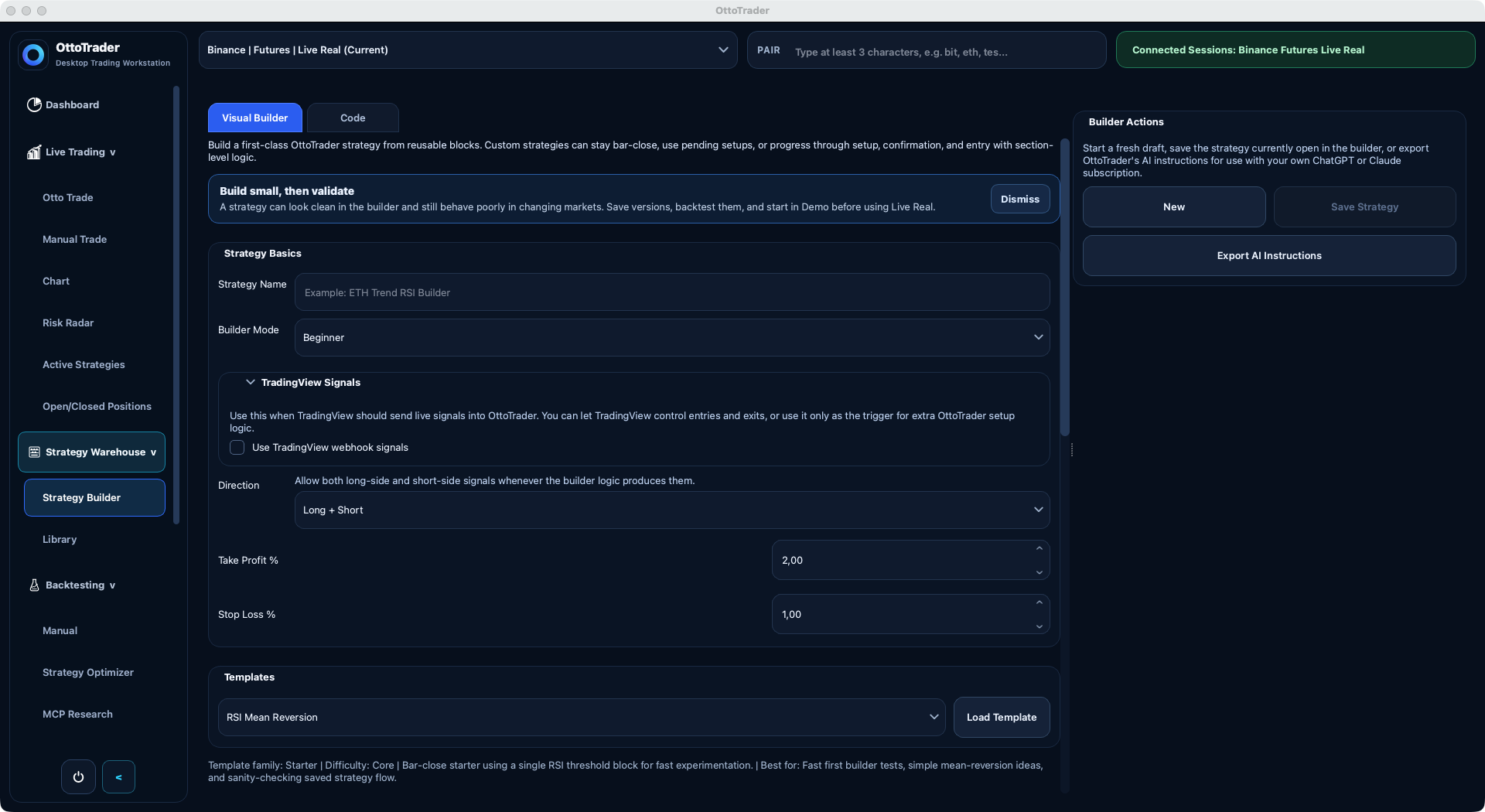
Strategy builder
Make the rules explicit.
Start with visual blocks or code. Use starter templates, review your rules, and export instructions for drafting with ChatGPT or Claude.
Boundary model
Website account services wrap the desktop. They do not replace it.
The website solves account, marketplace, and remote companion needs without turning the browser into the trading engine.
Website account
Create your account, manage MFA, billing, downloads, marketplace ownership, tutorials, support, Seller Studio, and Remote Trading Center companion views without mixing those jobs into execution.
Desktop authority
Connect exchanges, store supported credentials locally, build and validate strategies, run Demo or Live Real contexts, and approve final trading actions from the workstation.
TradingView bridge
TradingView alert mistakes usually come from separated setup. Otto Trade creates private webhook URLs and alert-message templates beside the exchange, pair, mode, sizing, and strategy context that will receive the signal.
Execution guardrails
TradingView can provide live alerts, but OttoTrader still owns matching, protection, sizing, runtime context, Demo versus Live Real separation, and local validation.
Workflow
From idea to monitored operation.
The desktop keeps the same strategy visible as it moves from build to validation, then into Demo or Live Real operation.
Build
Turn loose trading ideas into explicit strategy rules with Visual Builder, Code, imports, TradingView alert setup, or AI-assisted drafts.
Validate
Find weak assumptions before they cost real money with manual backtests, Strategy Optimiser research, costs, robustness checks, and reports.
Operate
Run automation only with the context visible: pair, exchange, mode, sizing, protections, manual positions, and Demo versus Live Real separation.
Monitor
Keep statistics, positions, running strategies, RTC snapshots, and risk visible while the desktop remains the execution authority.
Operator controls
Running a strategy should not mean losing control.
The problem with automation is not that it acts fast. It is that many tools hide context after it starts. OttoTrader keeps confirm, pause, inspect, protect, and stop controls close to the running session.
Automation should never feel like it left without you. Pause, resume, or stop strategies while exchange, market type, mode, pair, and protection status stay visible.
When a position is already open, context matters. Move stops to break-even, adjust protection where supported, and manage positions without losing runtime identity.
Live mistakes often start in mode confusion. Keep Demo and Live Real workflows separated, and verify TradingView webhook behavior in Demo before Live Real.
Desktop download
Download the Desktop Trading Workstation.
1. Create account
Create or log in to an OttoTrader account to unlock the desktop installer.
2. Download Desktop App
Available once logged in
3. Start in Demo
Confirm email, set up MFA, sign in inside desktop Settings > Account, then use Demo before Live Real. Website and desktop both read the same account, so the installer link, trial lifecycle, and in-app access rules stay aligned.
Next step
See how the full platform fits around the desktop.
The desktop solves the operating problem. The platform page shows how the website, backend, marketplace, and RTC support that local-first workflow around it.